Send Data (User Frame)
Instruction Parameters
Supported PLC Series
| XPnA/1R | XPnB | XPnE | XPnF | CP3A/B/P/U CP4A~D/U | CPnE | CPnF | BP | PLC-S |
|---|---|---|---|---|---|---|---|---|
| ✓ | ✓ | ✓ | ✓ | ✓ | ✓ | ✓ | ✓ | ✓ |
Supported Data Registers
| M | X | Y | K | L | F | T | C | S | Z | R | Q | D | @D | Constant | |
|---|---|---|---|---|---|---|---|---|---|---|---|---|---|---|---|
| PID | ✓ | ✓ | ✓ | ✓ | ✓ | ✓ | ✓ | ✓ | - | ✓ | - | ✓ | ✓ | ✓ | ✓ |
| F_Name | ✓ | ✓ | ✓ | ✓ | ✓ | - | - | - | - | ✓ | - | ✓ | ✓ | ✓ | ✓ |
| Result | ✓ | ✓ | ✓ | ✓ | ✓ | - | - | - | - | ✓ | - | ✓ | ✓ | ✓ | - |
Supported Flags
| Flag | Bit | Support |
|---|---|---|
| Error | F11.0 | ✓ |
| Zero | F11.1 | - |
| Carry | F11.2 | - |
Number of Steps
| Steps |
|---|
| 4 |
Operands
| Operand | Description |
|---|---|
| PID | The first operand. Entries are WORD data registers or constants. This is the Program ID for the communication configuration program. |
| F_Name | The second operand. Entries are WORD data registers or constants. This is the index and frame to send data to. |
| Result | The third operand. Entries are only WORD data registers. This is where the result of the transmission is stored. |
Assignment Example
The following example shows how to assign values to F_Name.
F_Name
| Index | Frame Number |
|---|---|
| Bits 8 ~ 15 | Bits 0 ~ 7 |
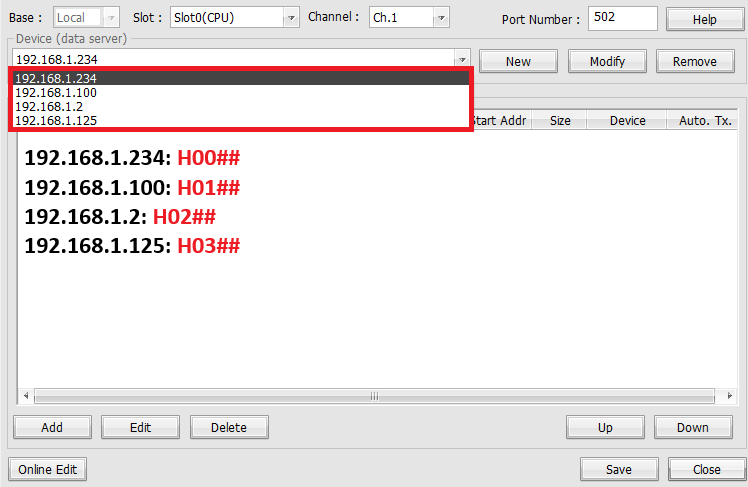
Indexing 1
- The index number is the corresponding IP address in the communication program.
- H00
- H01
- H02
- H03
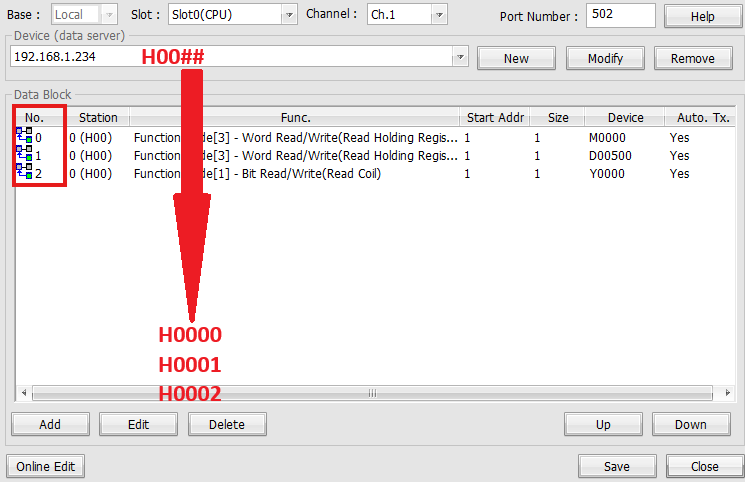
Indexing 2
- The fame number is the corresponding number in the data block section of the communication program.
- H##00
- H##01
- H##02
Result Format Execution
| Bit Number | Description |
|---|---|
| Bit 0 | Transmission Completed: ON (1 Scan) Transmission Failed: ON (Always) |
| Bit 1 | Transmission Failed: ON (Always) |
| Bit 2 ~ 7 | OFF (Not Used) |
| Bit 8 ~ 15 | Error Code (0 = No error) |
Notice
Error Flag (F11.0) Notice
Instruction Behavior
The SEND and SENDP instructions behave as follows:
- It is required that the SEND instruction be used with a pulse contact as an execution condition, or use the SENDP instruction to prevent data transmission error.
- It is required to have an existing communication configuration program in the project.
- If not, the instructions will not execute.