Watchdog Timer
Instruction Parameters
Supported PLC Series
| XPnA/1R | XPnB | XPnE | XPnF | CP3A/B/P/U CP4A~D/U | CPnE | CPnF | BP | PLC-S |
|---|---|---|---|---|---|---|---|---|
| ✓ | ✓ | ✓ | ✓ | ✓ | ✓ | ✓ | ✓ | ✓ |
Supported Data Registers
| M | X | Y | K | L | F | T | C | S | Z | R | Q | D | @D | Constant |
|---|---|---|---|---|---|---|---|---|---|---|---|---|---|---|
| - | - | - | - | - | - | - | - | - | - | - | - | - | - | - |
Supported Flags
| Flag | Bit | Support |
|---|---|---|
| Error | F11.0 | - |
| Zero | F11.1 | - |
| Carry | F11.2 | - |
Number of Steps
| Steps |
|---|
| 1 |
Notice
Notice
The User WDT error occurs when one of the scan times before or after the WDT or WDTP instruction exceeds the setting value of the watchdog timer.
The Watchdog Timer Error flag will be ON (1) during this time.
Instruction Behavior
The WDT and WDTP instruction behaves as follows:
- The WDT and WDTP instructions reset the watchdog timer during the execution of a sequence program.
- When the scan time exceeds the setting value of the watchdog timer, a User WDT error occurs and the PLC stops.
- To avoid this error, increase the setting value of the watchdog timer.
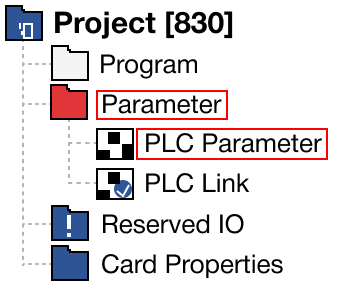
- Left-click the Parameter option and double-click PLC Parameter.
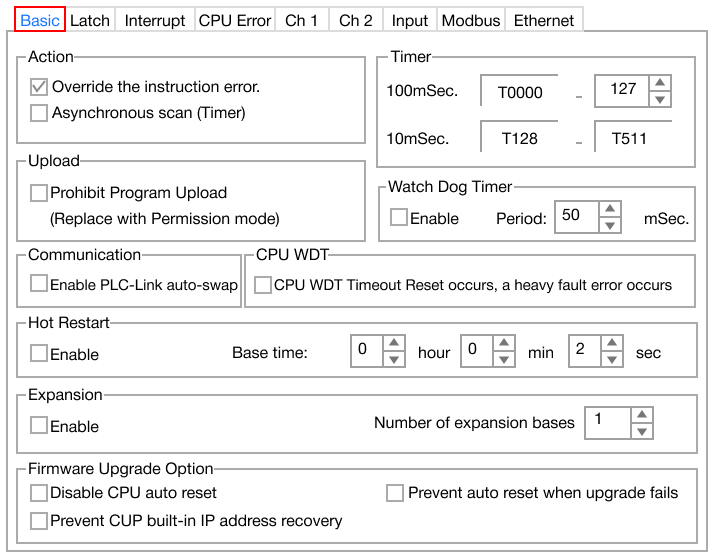 2. Left-click the Basic navigation tab.
 3. Left-click Enable to enable the watchdog timer and change the timer period.
- If the setting value cannot be increased, the WDT or WDTP instruction must be executed during the execution of the sequence program.
- To avoid this error, increase the setting value of the watchdog timer.
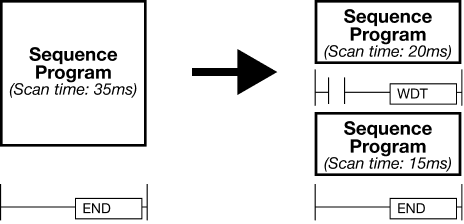
- Scan time, t1, from step 0 ~ WDT or WDTP and scan time, t2, from WDT or WDTP ~ END must not exceed the setting value of the watchdog timer.
- Multiple WDT and WDTP instructions can be used during a scan.
- Doing so may cause a delay until the output refreshes.
- When a scan begins in the sequence program with the WDT or WDTP instructions being executed, the watchdog timer runs until the scan meets the WDT or WDTP instruction.
- When the scan meets the WDT or WDTP instruction, the watchdog timer is reset.
- If the setting value of the watchdog timer is 30ms, the WDT or WDTP instructions have to be located at the point where the scan time from step 0 ~ WDT or WDTP and the scan time from WDT or WDTP ~ END do NOT exceed 30ms.
- If the setting value of the watchdog timer is 30ms, the WDT or WDTP instructions have to be located at the point where the scan time from step 0 ~ WDT or WDTP and the scan time from WDT or WDTP ~ END do NOT exceed 30ms.
- When the scan meets the WDT or WDTP instruction, the watchdog timer is reset.