Useful Settings
Options Menu
CICON includes many different settings to make project creation seemless. We recommend enabling a few of these settings.

- On the navigation bar, left-click Tool and left-click Options.
Dots for Data Registers
In CICON, users can interact on the BIT level of WORD, DWORD, or REAL data registers.
- In the default ladder, data register manipulation on the bit level looks like this:

- This reads, if the 10th bit (A) of the contact WORD M00 is ON (1), then the 5th bit of the coil WORD Y00 is ON (1).
- After enabling the dot operator for data registers, the ladder will look like this:

- This rung functions the same as before. However, it is now more intuitive to view bit-level operations.
Enable Option
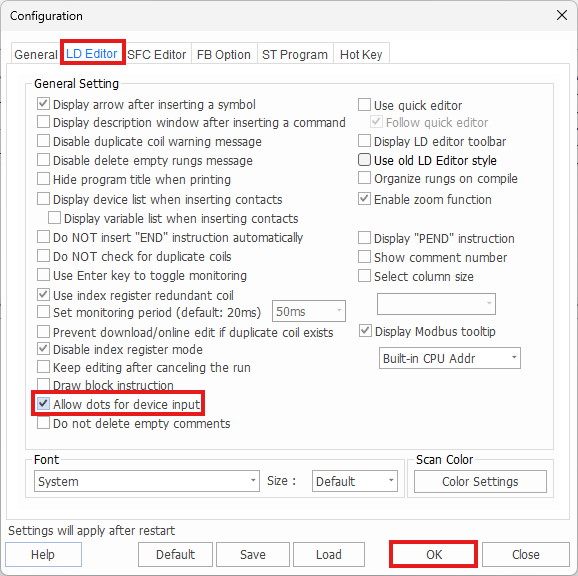
- To enable the dot operator, in the Options menu, left-click LD Editor.
- Select Allow dots for device input and left-click OK.
- Reopen the scan program.
Modbus Tooltip

CICON offers the ability to view a data register's Modbus register equivalent.
To view the Modbus register, hover over the CICON data register.
Enable Option
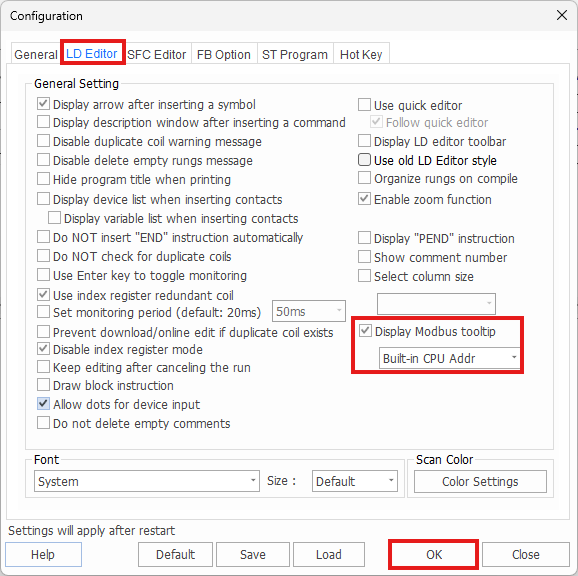
- To enable the dot operator, in the Options menu, left-click LD Editor.
- Select Show Modbus Tooltip and left-click OK.
- Reopen the scan program.