Example - Ladder Diagram
REHUM

The REHUM instruction uses the air temperature, S1, wet-bulb temperature, S2, and air pressure, S3, to calculate the relative humidity and dew point and saves both in the assigned WORD data registers, D and D+1.
Ladder Diagram Example

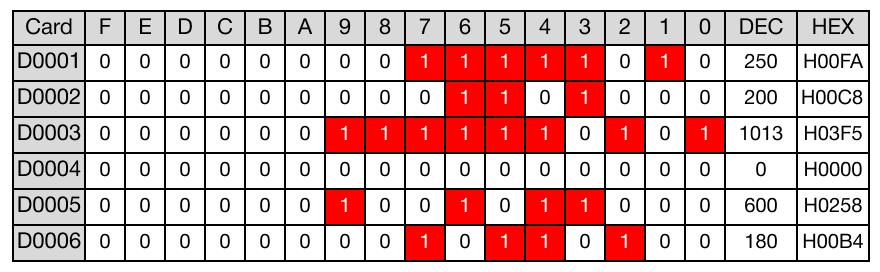
The REHUM instruction calculates the relative humidity using the following values: 25°C (D1), 20°C (D2), and 101.3hPA (D3).

When the contact, M4.0, is powered ON (1), the data register, D5, is set to 600 and the data register, D6, is set to 180.
These are the relative humidity and dew point values, respectively.
Memory Monitor
REHUMP

The REHUMP one-shot instruction uses the air temperature, S1, wet-bulb temperature, S2, and air pressure, S3, to calculate the relative humidity and dew point and saves both in the assigned WORD data registers, D and D+1.
Every time this instruction energizes, it executes only once.
Ladder Diagram Example

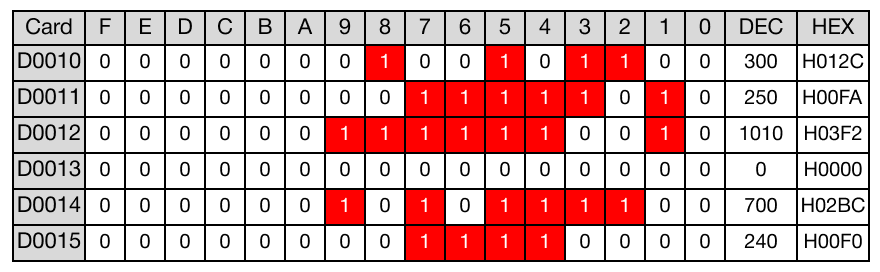
The REHUM instruction calculates the relative humidity using the following values: 30°C (D10), 25°C (D11), and 101hPA (D12).

When the contact, M5.0, is powered ON (1), the data register, D14, is set to 700 and the data register, D15, is set to 240.
These are the relative humidity and dew point values, respectively.
Memory Monitor