CICON Simulator Tutorial
| Comparing Internal/Local/Global Variables and PLC Data Register | ||||
|---|---|---|---|---|
| Items | Internal Variable | Local Variable | Global Variable | Data Register |
| Number of variables that can be registered in a single ST program. | 500 | 500 | - | - |
| Number of variables that can be registered in a project | 64,000 | 64,000 | 10,000 | CPU specifications |
| Adding arrays/structures (deceleration and usage) | - | ✓ | ✓ | - |
| PLC data register allocation (ex. D15) | - | - | ✓ | - |
| Retain setting (maintaining value after power reset (latch)) | - | - | ✓ | ✓ |
| Online Edit modification (add/edit) | ✓ | - | ✓ | ✓ |
| Online Edit - maintaining data | - | - | ✓ | ✓ |
| Usage in scan program | - | - | ✓ | ✓ |
| Monitoring in device monitor | - | - | ✓ | ✓ |
| Monitoring in memory monitor | - | - | ✓ | |
| Usage in special programs (communication, special) | - | - | - | ✓ |
| Data backup/recovery function | - | - | - | ✓ |
| Use of names in Korean and other non-English languages | - | - | - | - |
Creating the ST Program
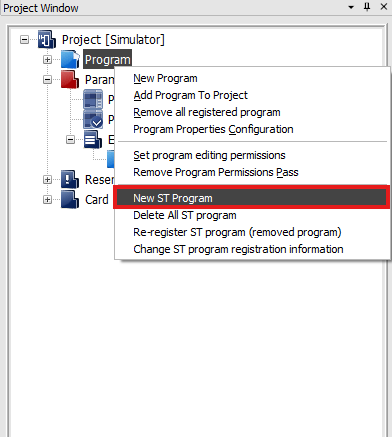
- To create a Structured Text program, right-click in the Project Window and left-click New ST Program.
- Up to 128 Structured Text programs can be created.
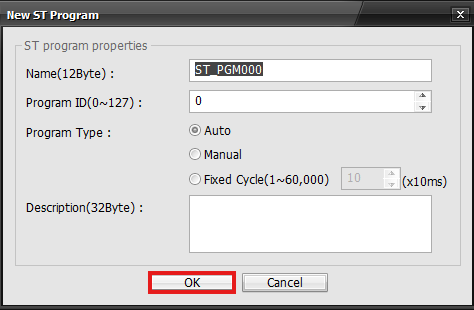
- Give the program a name, ID, define its type, and a description. When finished left-click OK.
- Program Type:
- Auto: Runs each scan
- Manual: Called with the STRUN instruction
- Fixed Cycle: Runs every specified milliseconds
Registering Variables
Local Variables
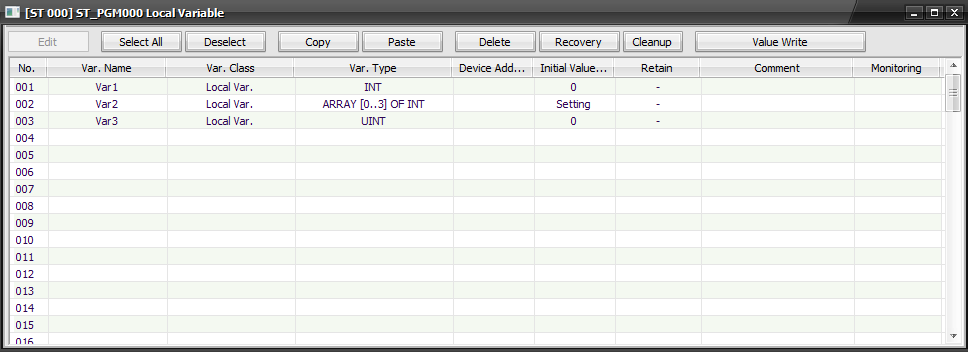
- Buttons:
- Edit: Edit the currently selected variable
- Select All: Select all local variables
- Deselect: Deselect the variables
- Copy: Copy the currently selected variable
- Paste: Paste the currently copied variable
- Delete: Delete the currently selected variable
- Recovery: Recover the currently modified variable
- Cleanup: Organize the variable list
- Value Write: Write a value to the variable
- Variable Information:
- No.: Variable number
- Var. Name: Name of the variable
- Var. Class: Type of variable (global, local, internal)
- Var. Type: Variable data type
- Device Address: Attached data register address
- Initial Value: The initial value of the variable
- Retain: Unavailable for local variables
- Comment: Variable comments
- Monitoring: Monitor the values of the variable
Global Variables
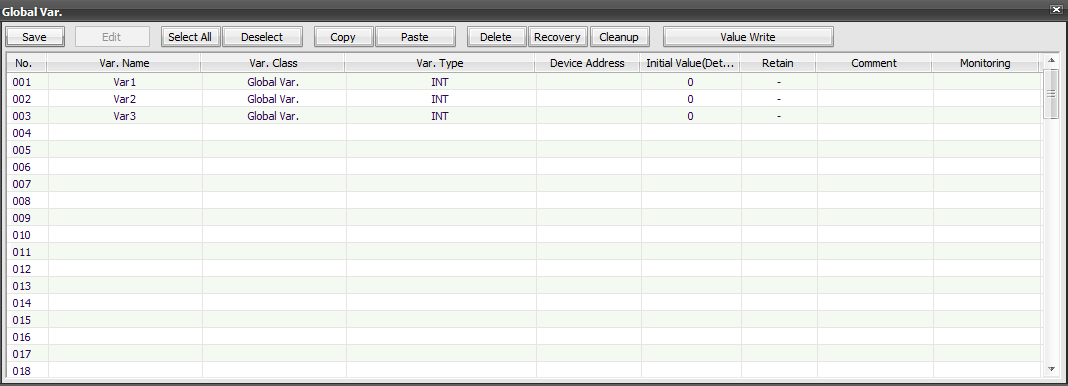
- Buttons:
- Edit: Edit the currently selected variable
- Select All: Select all local variables
- Deselect: Deselect the variables
- Copy: Copy the currently selected variable
- Paste: Paste the currently copied variable
- Delete: Delete the currently selected variable
- Recovery: Recover the currently modified variable
- Cleanup: Organize the variable list
- Value Write: Write a value to the variable
- Variable Information:
- No.: Variable number
- Var. Name: Name of the variable
- Var. Class: Type of variable (global, local, internal)
- Var. Type: Variable data type
- Device Address: Attached data register address
- Initial Value: The initial value of the variable
- Retain: Latch the variable value
- Comment: Variable comments
- Monitoring: Monitor the values of the variable
Internal Variables

Internal variables are used within the Structured Text program logic.
- How to Use:
- Variable Name: Data Type; between VAR and END_VAR;.
- Up to 500 declarations per program.
- Can be declared anywhere in the ST program. Can only be used after the declaration.
- Unique names only.
- Array and Struct types cannot be registered and used.
Compiling & Building

- To compile and build the Structured Text program, left-click Tool and left-click Compile All.
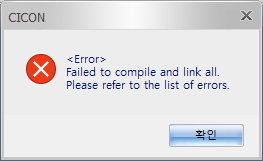
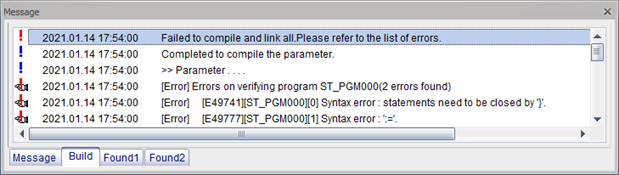
- If there are any errors, the above messages will appear.
Debugging
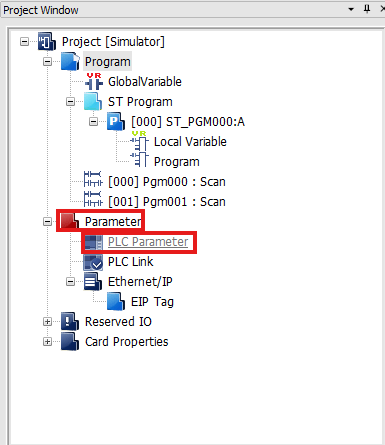
- Left-click Parameter and left-click PLC Parameter.
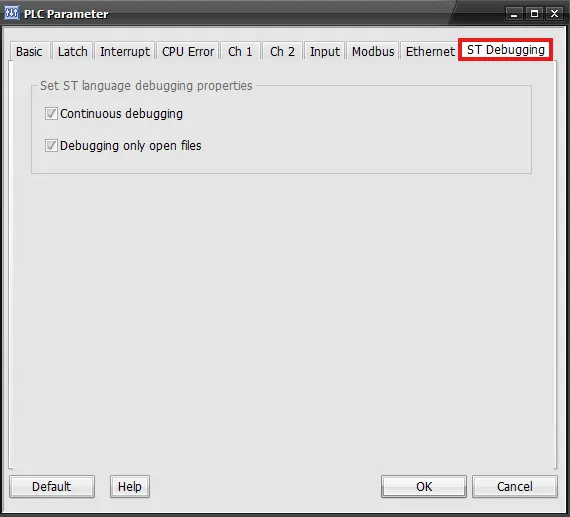
- Left-click ST Debugging and check both options.
- Continuous debugging:
- Consistently debug or not.
- When this option is true, there must be a breakpoint before starting a debugging procedure. If it's added while debugging, the breakpoint will not operate.
- Consistently debug or not.
- Debugging only open files:
- Debugging will only occur if the currently display ST program is on the screen.
- If the program window is opened or closed during the debugging procedure, that program will be included in or excluded from the debugging procedure.
- Debugging will only occur if the currently display ST program is on the screen.
Hot Key

- Type F5 on the keyboard to being debugging.

- While debugging:
- F6: Debugs until the next step.
- F9: Adds or removes a breakpoint.
- Shift + F5: Stops debugging.
Troubleshooting
Infinite Loop
When repetitive statements like WHILE or REPEAT are used, the conditional expression must be configured properly. Otherwise, an infinite loop may occur.
If an infinite loop is created in a program, the PLC may malfunction, error, or cause the LED lights to blink.
- Move the RUN/STOP switch of the PLC CPU to LOCAL STOP.
- Turn OFF and ON the PLC power.
- Open CICON and download the modified ST program.
- Move the RUN/STOP switch of the PLC CPU to LOCAL RUN or Remote RUN.