High-Speed Counter for PLC-S Special Program Example
Introduction
This section provides a comprehensive overview of high-speed counting capabilities within CICON. High-speed counting is a crucial feature for applications requiring the precise counting of rapid pulses, commonly used in industries such as packaging, robotics, and material handling.
High-speed counting can be achieved using various hardware options, depending on your system requirements. It can be implemented using the PLC-S mini modular or the Micro-S CPU types, both of which are suitable for smaller, space-constrained projects that still demand reliable high-speed pulse counting. Additionally, for systems requiring enhanced performance or flexibility, the CM3-SP02HSC or CM3-SP02HSD expansion module offers advanced capabilities, providing higher speed and a greater number of counting channels. The PLC-S Plus CPU, though not containing a high-speed counter functionality, can control high-speed counting through the embedded EtherCAT.
To create the high-speed counter special program, follow the steps below:
Registering the Special Program
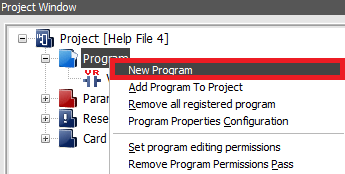
- In the Project Window, right-click Program and left-click New Program.
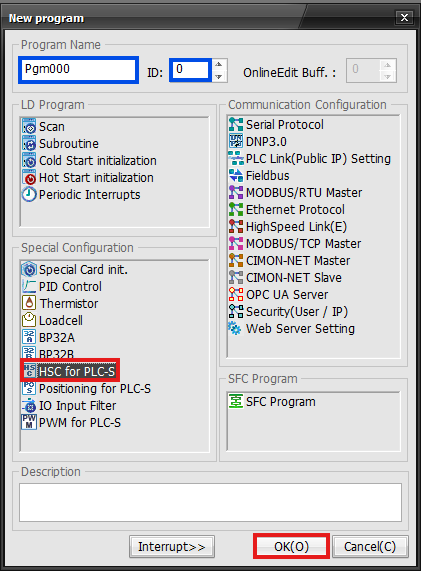
- In the New Program window, left-click HSC for PLC-S.
- Optionally, for organization, under Program Name, the name of the program and ID can be changed.
- Left-click OK.
Configuring the High-Speed Counter Program
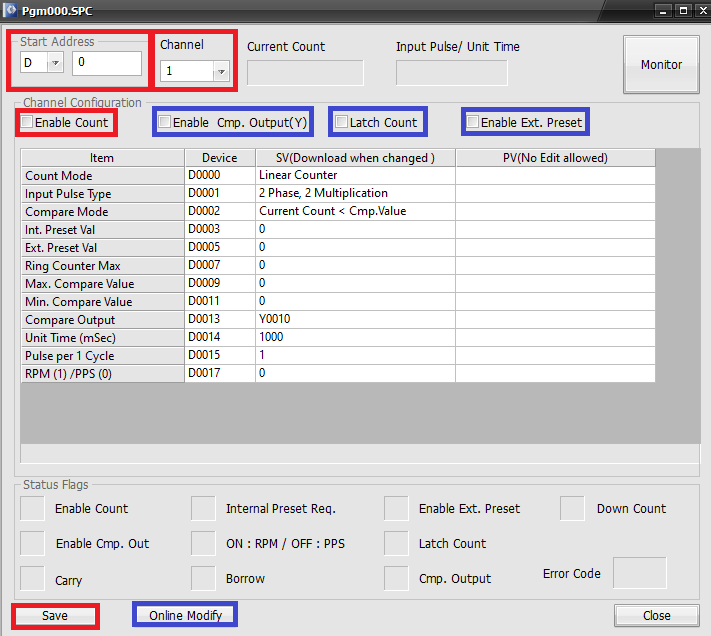
- Under Start Address, select the data register section to use.
- IMPORTANT: The high-speed counter program can reserve 52 WORDs, 26 for channel 1, 26 for channel 2, starting at the base data register.
- In this example, D0 ~ D51 are reserved.
- Please refer to the high-speed counter parameters for more information.
- In this example, D0 ~ D51 are reserved.
- IMPORTANT: The high-speed counter program can reserve 52 WORDs, 26 for channel 1, 26 for channel 2, starting at the base data register.
- Under channel, select channel 1 or channel 2.
- For the high-speed counter to actively count, check Enable Count.
- If this is unchecked, the high-speed counter won't count up or down.
- Optionally, checking:
- Enable Cmp. Output(Y) enables comparison output.
- Latch Count enables non-volatile memory counting.
- The current value enables be retained if the device is powered off.
- Enable Ext. Preset enables an external preset value.
- Left-click Save to save the changes made to the high-speed counter program.
- Optionally, if the PLC-S is currently in RUN mode, left-click Online Modify.
Scan Program

- Create a new scan program.
- This example will always compare D100 ≤ D21.
- D21 is the current value of the high-speed counter on channel 1.
- This example will always compare D100 ≤ D21.

- After downloading the program to the PLC, the value of D21 can be monitored. The coil, Y10.D is deenergized.

- Once the value of D21 was greater than or equal to the value of D100, 45,678, the coil Y10.D energizes.