Pulse-Width Modulation for PLC-S Special Program Parameters
Pulse-Width Modulation Parameters
Pulse-Width Modulation Output Enable
- The pulse-width modulation output enable will enable the channels for pulse-width modulation when set to 1 or general digital output when set to 0.
- The PWM output function can be enabled by using the TO instruction.
| PWM Channel Enable Bit Mapping | ||||||||||||||||
|---|---|---|---|---|---|---|---|---|---|---|---|---|---|---|---|---|
| Buffer Memory 0 | Bit 0 | Bit 1 | Bit 2 | Bit 3 | Bit 4 | Bit 5 | Bit 6 | Bit 7 | Bit 8 | Bit 9 | Bit 10 | Bit 11 | Bit 12 | Bit 13 | Bit 14 | Bit 15 |
| Channel Number | Channel 1 | Channel 2 | Channel 3 | Channel 4 | Channel 5 | Channel 6 | Channel 7 | Channel 8 | Channel 9 | Channel 10 | Channel 11 | Channel 12 | Reserved | Reserved | Reserved | Reserved |
Frequency Control
- The pulse-width modulation supports functions to control the frequency range from 0 ~ 4,000pps.
- 4 channels per group can be controlled.
- A total of 3 groups can be controlled.
- 4 channels per group can be controlled.
- The frequencies of each group are set by the TO instruction.
| Frequency Control | |||||
|---|---|---|---|---|---|
| Frequency A or General Digital Output | Frequency B or General Digital Output | Frequency C or General Digital Output | |||
| Channel 1 | Yn.2 | Channel 5 | Yn.A | Channel 9 | Yn+1.2 |
| Channel 2 | Yn.3 | Channel 6 | Yn.B | Channel 10 | Yn+1.3 |
| Channel 3 | Yn.6 | Channel 7 | Yn.C | Channel 11 | Yn+1.4 |
| Channel 4 | Yn.7 | Channel 8 | Yn.D | Channel 12 | Yn+1.5 |
- Every 4 PWM output included in a group are operated in the same frequency.
- 3 different frequency outputs are available at the same time since 3 groups are offered.
- When the TO instruction is operated on the buffer memory, the output terminal outputs the designated frequency instantly.
- To prevent a sharp change of frequency, refer to frequency RAMP control.
- If the frequency value is over 4,000pps, both the valid range f the DUTY cycle and degree of precision are decreased.
| Frequency Precision Values | ||
|---|---|---|
| Frequency (pps) | Minimum Value of DUTY Cycle (%) | Maximum Value of DUTY Cycle (%) |
| 5,000 | 1.0 | 98.0 |
| 10,000 | 1.5 | 95.0 |
| 15,000 | 3.0 | 94.0 |
| 20,000 | 4.0 | 93.0 |
| 25,000 | 5.0 | 91.0 |
| 30,000 | 6.0 | 89.0 |
| 35,000 | 7.0 | 87.0 |
| 40,000 | 9.0 | 85.0 |
| 45,000 | 10.0 | 83.0 |
| 50,000 | 12.0 | 82.0 |
| 55,000 | 13.0 | 80.0 |
| 60,000 | 14.0 | 78.0 |
| 65,000 | 15.0 | 75.0 |
RAMP Control
- RAMP control can be used to prevent a sharp change of the frequency and DUTY cycle.
- The output will be gradually changed during the RAMP control time, which the value of the frequency or DUTY cycle have configured.
- When the set value of the RAMP control time of buffer memory is 0, output will be changed immediately.
- The following is a method for RAMP control:
- Change the RAMP control time before the value to control as intended.
- In case of a power reset or CPU STOP during the RAMP operation, reset the value again by using the TO instruction.
- The value of the buffer memory will be set back to the initial value, 0.
Frequency RAMP Control Time
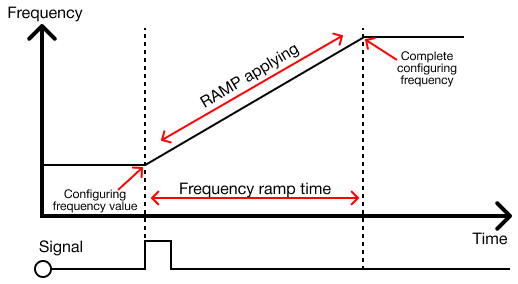
- The frequency will be changed through the set RAMP control time when the frequency value is changed after setting the frequency RAMP control time.
- The frequency RAMP control time can be set by using the TO instruction.
- In case the frequency RAMP control time is changed during the RAMP operation, it will be applied to the NEXT RAMP operation.
- In case of a power reset or CPU STOP during the RAMP operation, reset the value again by using the TO instruction.
Controlling DUTY Cycle
- The pulse-width modulation supports functions to control the DUTY cycle 0.0% ~ 100.0% within 1/1,000 resolution.
- The DUTY cycles are able to be controlled per channel for a total of 12 channels.
- The DUTY cycle can be set using the TO instruction.
- When the TO instruction is operated, the output terminal will be configured to set the DUTY cycle and being output.
- To prevent a sharp change of frequency, refer to frequency RAMP control.

- If the digital signal of +12V-+24V voltage is set to the DUTY cycle 70.0% (as shown above), the voltage output of +8.4V-+16.8V in average is available.
- The DUTY cycle control (PWM) can be utilized in various ways of substituting an analog signal.
- Controlling the speed of a motor, switch, or ratio of a value are examples.
DUTY Cycle RAMP Control
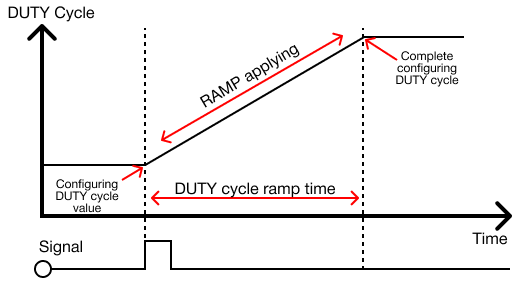
- If the DUTY cycle's value is configured after setting the DUTY cycle RAMP control time, the DUTY cycle will be gradually changed during the set RAMP control time.
- The DUTY cycle ratio can be set using the TO instruction.
- In case the DUTY cycle ramp control time is configured during the AMP operation, it will be applied to the NEXT RAMP operation.
- In case of a power reset or CPU STOP during the RAMP operation, reset the value again by using the TO instruction.
- The value of the buffer memory will be set back to the initial value, 0.