Project Properties
PLC Selection
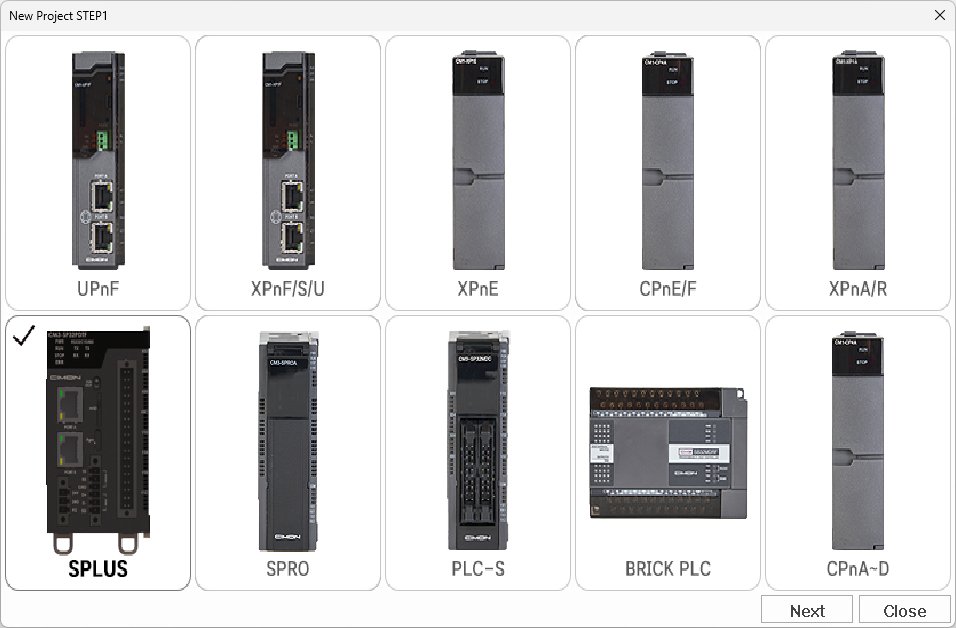
Select from the available PLC CPU options. This is important for downloading a project to the PLC. Some features depend on specific CPU types.
Project Details
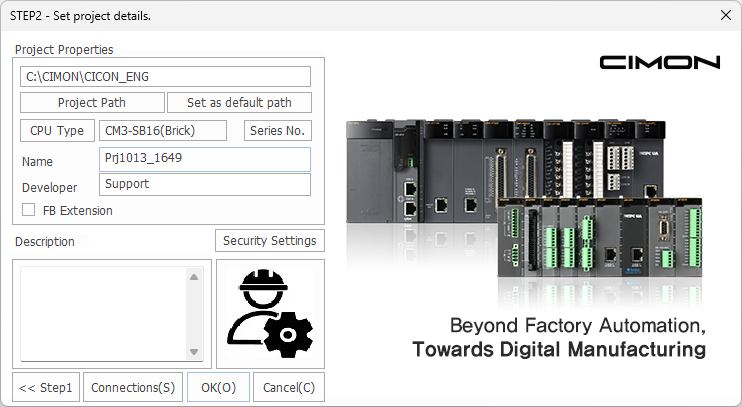
| Item | Description |
|---|---|
| C:\CIMON\CICON_ENG | Displays the path of the project's location. This is example is the default path. |
| Project Path | Changes the save location for the project. |
| Set as default path | Changes the default save location for other projects to the specified path. |
| CPU Type | Changes the PLC CPU type. Select from the PLC selection window. |
| CM3-SB16(Brick) | Displays the current series type (if applicable). |
| Series No. | Changes the PLC CPU series to a different module.For example: CM3-SB16 → CM3-SB32. |
| Name | Sets the project's name. |
| Developer | Sets the project's developer. |
| FB Extension | Enables or disables the Function Block extension. |
| Security Settings | Enables or disables password or permission mode. |
| Description | Sets the project's description. |
| << Step1 | Opens the PLC selection window. |
| Connections | Opens the connection setup window. |
| OK | Saves the current properties and closes the current window. |
| Cancel | Discards the current properties and closes the current window. |
Project Details - Security
| Icon | Description |
|---|---|
 Permission Mode | Indicates permission mode is enabled on the project. |
 Password Mode | Indicates password mode is enabled on the project. |
 | Indicates no security mode is enabled on the project. |