Create Function Blocks
Project Setup
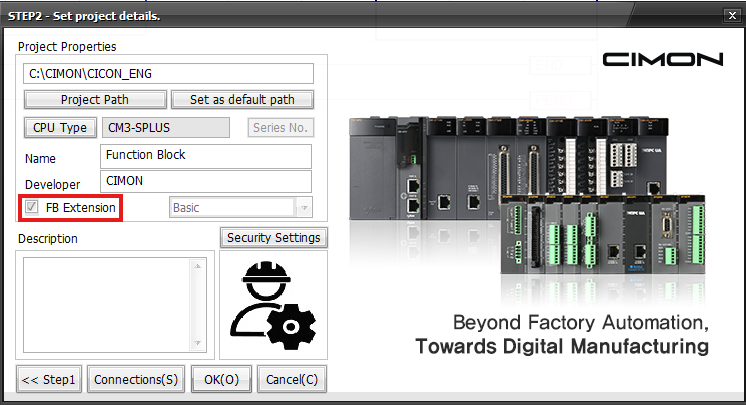
To utilize Function Block Extension, when creating a project, enable the FB Extension option.
Create
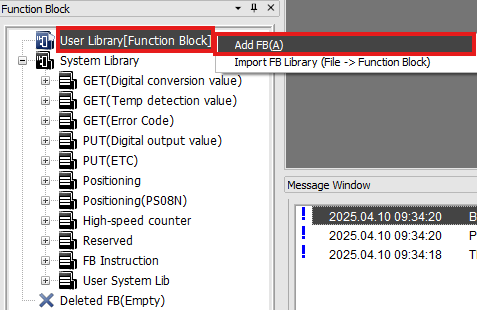
- To create a Function Block, in the Function Block window, right-click User Library[Function Block] and left-click Add FB(A).
- Note:
- User Library: Function Blocks created by the user are saved here. These can be edited, imported, and exported. User Library belongs to the project. So, if a new project is created, the Function Blocks do NOT transfer.
- System Library: Fixed Functions Blocks provided by CICON. These cannot be edited.
- User System Library: If users export Function Blocks to the User Library, they can be saved here. Function Blocks cannot be edited, but they can be deleted.
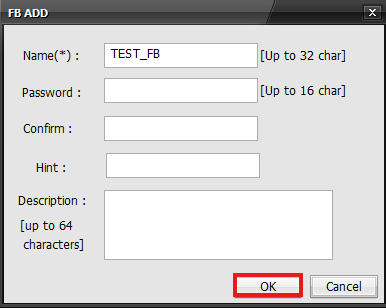
- Fill out the information for the Function Block and left-click OK.
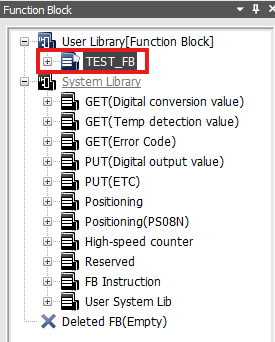
The Function Block will be added to the User Library.