Variables

- To add variables to the Function Block, in the Function Block window, expand the Function Block and double left-click Variable[?].
- The variable in the Function Block folder is a local variable that only works in the current Function Block folder.
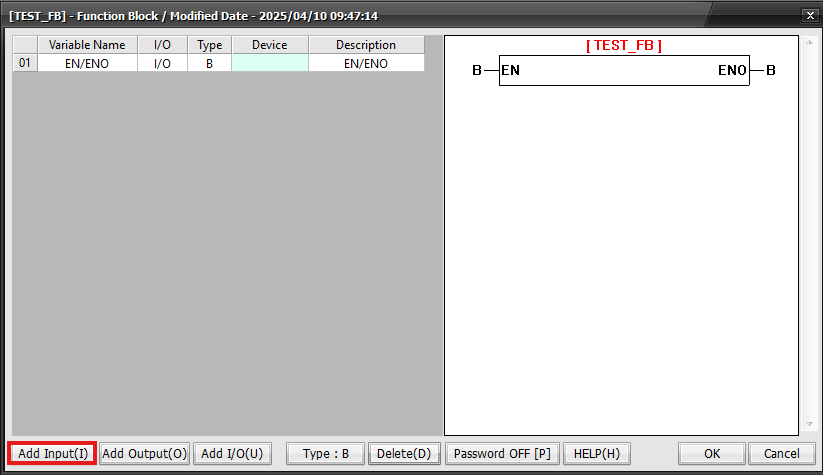
- To add a new input, output, or I/O device to the Function Block, left-click Add Input(I).
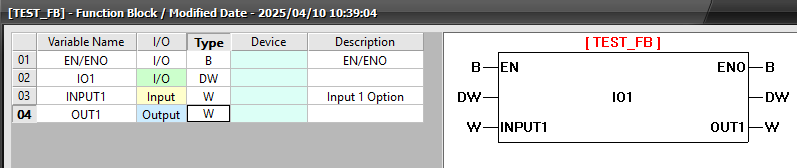
- The added option will appear in the Function Block.
- I/O: Input, Output, or I/O can be selected.
- Input: Read integer value or data register address.
- Output: Write data register address only.
- I/O: One data register address can be used for both input and output.
- The following data registers CANNOT be used for Output or I/O:
- X, F, T, TC, TS, C, CC, CS
- Type:
- B: BOOL, 0 or 1
- W: WORD, Unsigned 0 ~ 65,535, Signed -32,768 ~ 32767
- DW: DWORD, Unsigned 0 ~ 4,294,967,295, Signed -2,147,483,648 ~ 2,147,483,647
- F: REAL, -1.7014118e+38 ~ 3.4028237e+38 (2-127 ~ 2128)
- Device:
- Data register to be set up for each input or output.
- This can only be set in the ladder.
- Description:
- Maximum 16 characters can be used to provide a description for the variable.