Basic
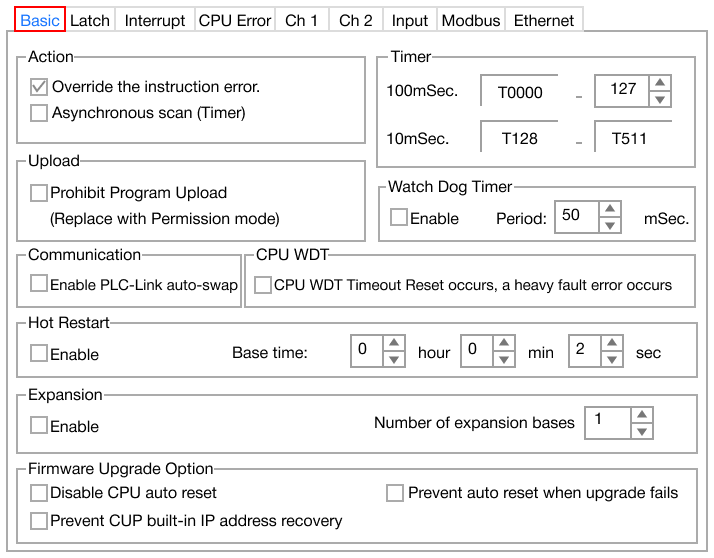
- The Basic PLC parameter contains the following sections:
Action

- Override the instruction error:
- If checked, the CPU keeps running even if there is an instruction error in a scan program.
- Asynchronous scan(Timer):
- If checked, scan time will not match timer.
Prohibit Program Upload

- Enable - (Replace with Permission mode):
- If checked, the project on the PLC is prevented from being uploaded to the computer.
- Refer to Program Password for more information.
- This parameter is automatically enabled or disabled.
Communication

- Enable PLC-Link auto-swap:
- If checked, in a redundancy system and the primary CPU fails, the secondary CPU will run automatically.
Hot Restart

- Enable:
- If checked and if the power is ON in the designated time, the hot start initialization program will run first before the scan program.
- *The following CPUs do NOT support Hot Restart due to no real-time clock (RTC) support:
Expansion

- Expansion:
- If checked, this will use the expansion base number.
- Only CM1-CP3 and CM1-XPxx support expansion base.
Firmware Upgrade Options

- Disable CPU auto reset:
- If checked, the PLC CPU will NOT automatically reset when upgrading the firmware.
- Prevent CPU built-in IP address recovery:
- If checked, the PLC CPU will NOT conduct an IP address recovery when upgrading the firmware.
- Prevent auto reset when upgrade fails:
- If checked, the PLC CPU will NOT automatically reset if the firmware fails to upgrade.
Timer

- 100mSec.:
- The default range for timer data registers clocking at 100ms.
- If the range is T0000 ~ T1, all timer data registers become 10ms.
- 10mSec.:
- The default range for timer data registers clocking at 10ms.
| CPU Timer Data Register Range |
|---|
| CPU Series | Timer Range |
|---|
| CM1-XP | T0000 ~ T4095 |
|---|
| CM1-CP | T0000 ~ T1023 |
|---|
| CM3 | T0000 ~ T0511 |
|---|
Watch Dog Timer

- Enable:
- If checked, the watch dog timer will be enabled.
- The range is 10ms ~ 60,000ms.
- If the watch dog timer is longer than the scan time, the CPU will automatically reset.
CPU Watch Dog Timer

- Treated as CPU WDT error:
- If checked, the CPU watch dog timer will be treated as an error.