Modbus RTU Introduction
Modbus RTU
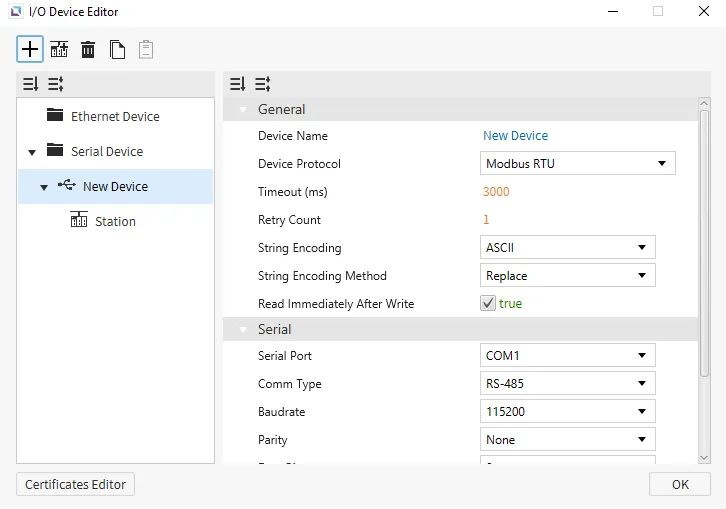
Section titled “Modbus RTU”Canvas supports Modbus RTU as a way to connect to devices that support this protocol. Users will be able to change the Read Block Tolerance.
Format
Section titled “Format”- General Format: {Memory Area Symbol}{Address Number}
Memory Area Symbol: refer to the table below. This component is required.- For Coil memory areas
Memory Area Symbol0, the leading 0 cannot be dropped.
- For Coil memory areas
Address Number: index of the memory area to access, represented in decimal notation.- Leading zeros are not required (i.e., 00025 is equivalent to 25).
Memory Area and Ranges
Section titled “Memory Area and Ranges”| Memory Area | Symbol | Digital Tag | Analog Tag | Access |
|---|---|---|---|---|
| Coil | 0 | 000001 - 029999 | - | R/W |
| Input | 1 | 100001 - 129999 | - | R |
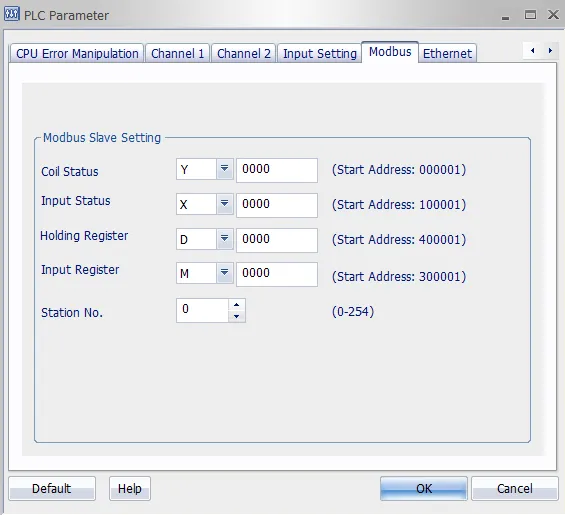
| Input Register | 3 | - | 300001 - 329999 | R |
| Holding Register | 4 | - | 400001 - 429999 | R/W |
Communication Cable Wiring
Section titled “Communication Cable Wiring”| Model | Image |
|---|---|
| Xpanel COM1/COM2 RS-232C | 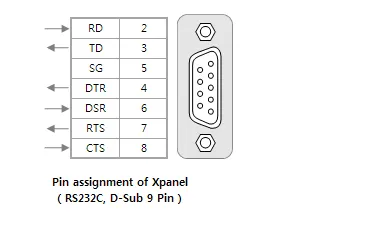 |
| Xpanel COM1 RS-422/485 | 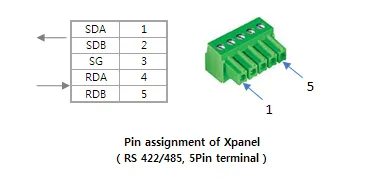 |
The above picture shows the RS-232C and RS-422/485 ports of the Xpanel. Please refer to your device manual for signal descriptions.
For the RS-232C ports, the Xpanel provides the standard DB9 RS-232C pin assignment. Typically, RD, TD, and SG pins are enough to communicate with a general Modbus device.