AD Modules
Analog to Digital (AD)
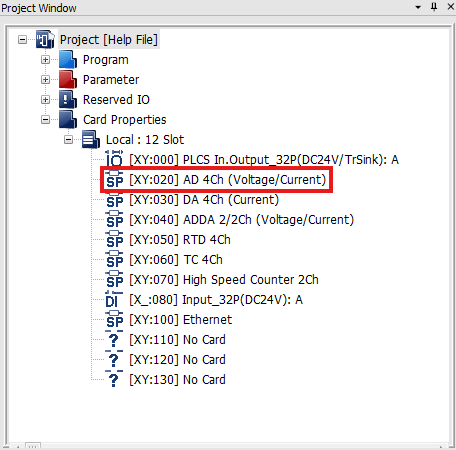
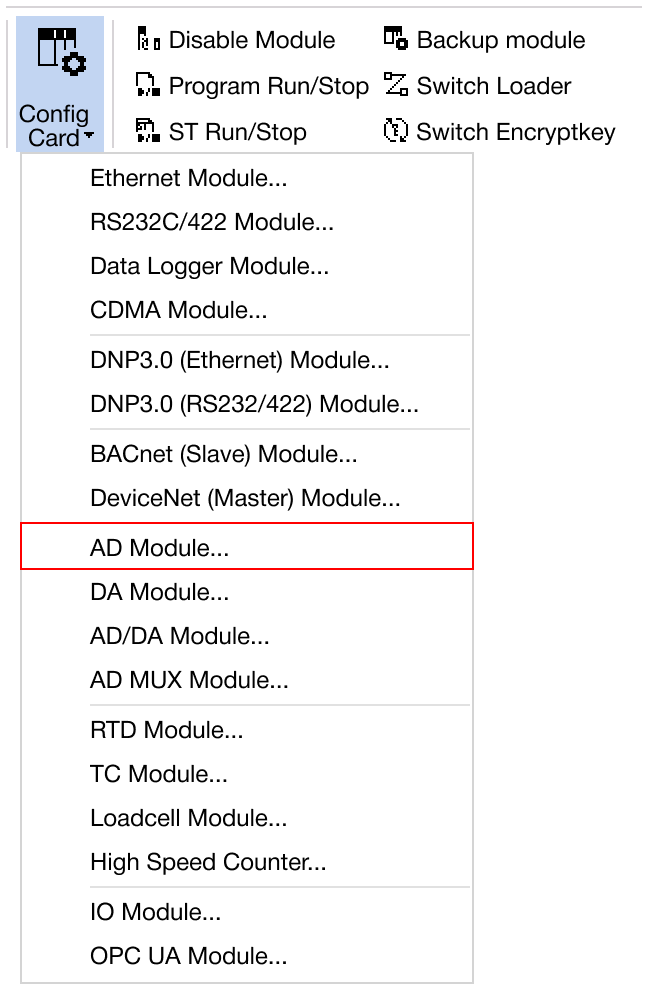
Navigate to Online → Special Module Setup → AD Module or click on the AD module within the Card Properties.
Applied Modules
- CM1-AD04VI
- CM1-AD08V
- CM1-AD08I
- CM1-AD04W
- CM3-SP04EAO
CM1 AD Module
-
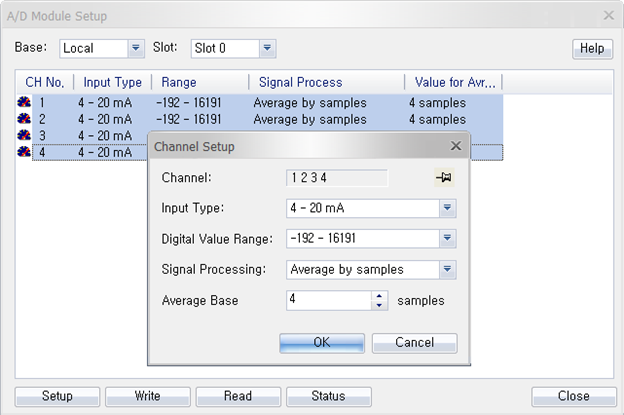
Hold CTRL to configure all channels at once.
-
Click Setup to choose the input type, digital value range, signal processing, and average base.
- Input Type:
- 4mA ~ 20mA
- 0mA ~ 20mA
- +1V ~ +5V
- 0V ~ +5V
- -10V ~ +10V
- 0V ~ 10V
- Disable
- Digital Value Range:
- -192 ~ 16,191
- -8,192 ~ +8,191
- 0 ~ 16,000
- -8,000 ~ +8,000
- Signal Processing:
- Average by samples
- Average by time
- Disable
-
Once the settings are configured, click OK to confirm and apply the changes.
-
To save the configured parameters to the PLC, click Write.
-
Click Read to check the parameters.
-
For real-time monitoring and module diagnostics, click Status. This displays the current value, minimum and maximum values, firmware version of the module, and any error codes.
CM3 AD module
-
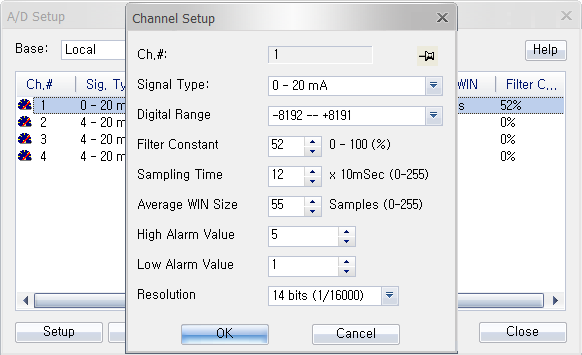
Hold CTRL to configure all channels at once.
-
Click Setup to choose the signal type, digital range, filter constant, sampling time, average window size, high alarm, low alarm, and resolution.
- Signal Type:
- 4mA ~ 20mA
- 0mA ~ 20mA
- +1V ~ +5V
- 0V ~ +5V
- -10V ~ +10V
- 0V ~ 10V
- Disable
- Digital Value Range:
- -192 ~ 16,191
- -8,192 ~ +8,191
- 0 ~ 16,000
- -8,000 ~ +8,000
- Filter Constant:
- 0% ~ 100%
- Sampling Time:
- 0ms ~ 2,550ms
- Average Window Size:
- 0 ~ 255 samples
- Low/High Alarm Value:
- Within digital conversion value range
- Resolution:
- 14 bits (1/16,000)
- 16 bits (1/64,000)
-
Once the settings are configured, click OK to confirm and apply the changes.
-
To save the configured parameters to the PLC, click Write.
-
Click Read to check the parameters.
-
For real-time monitoring and module diagnostics, click Status. This displays the current value, minimum and maximum values, firmware version of the module, and any error codes.