DNP3.0 Ethernet Modules
DNP3.0 Ethernet
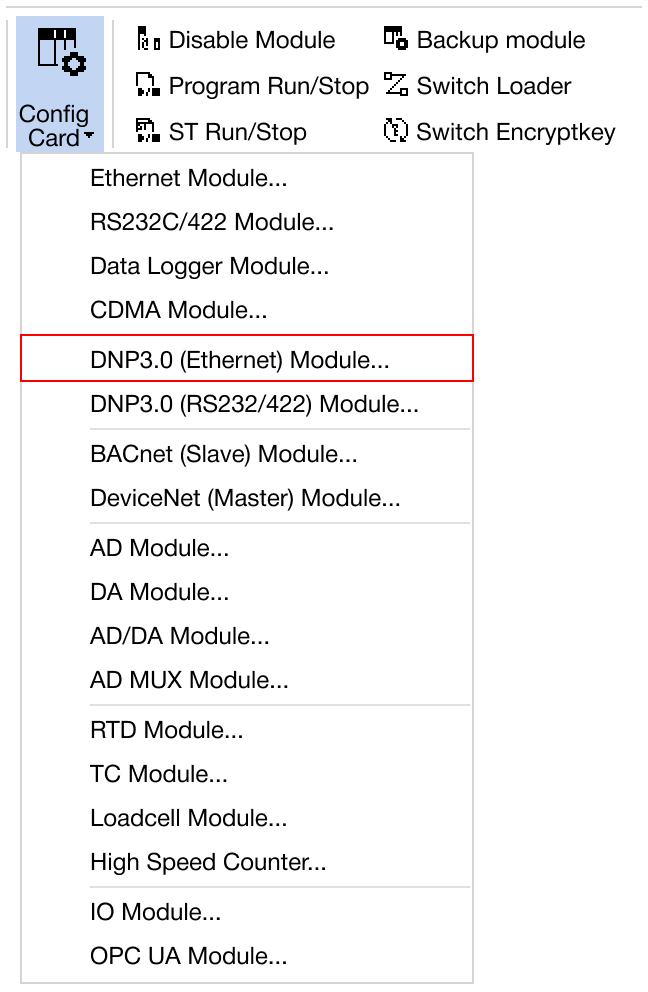
Navigate to Online → Special Module Setup → DNP3.0 (Ethernet) or click on the DNP3.0 Ethernet module within the Card Properties.
Applied Modules
- CM1-EC01DNP
- CM1-EC04DNP
DNP3.0 Ethernet Module
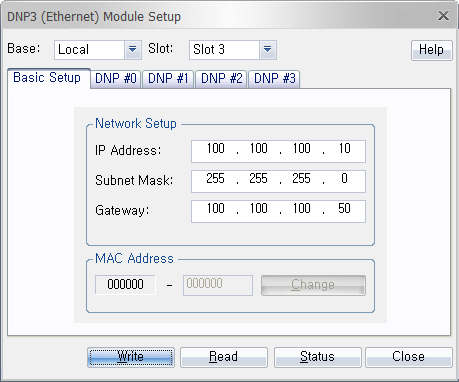
- Configure the IP address, subnet mask, gateway, and MAC address.
-
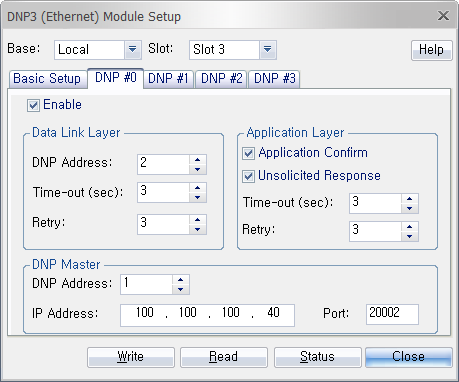
Configure the DNP3.0 settings: data link layer, application layer, or DNP master.
- Data Link Layer:
- DNP Address: Assign the DNP number to the DNP module.
- Time-out: Number of seconds before timing out the request.
- Retry: Number of times to retry connecting.
- Application Layer:
- Application Confirm: DNP module checks the communication status from the host.
- Unsolicited Response: If assigned data changes, the DNP module sends the changed data to the host.
- Time-out: Number of seconds before timing out the request.
- Retry: Number of times to retry connecting.
- DNP Master:
- DNP Address: Host address.
- IP Address: IP address of the host.
- Port: Port address for the host IP address.
- Data Link Layer:
-
Once the settings are configured, click OK to confirm and apply the changes.
-
To save the configured parameters to the PLC, click Write.
-
Click Read to check the parameters.
-
For real-time monitoring and module diagnostics, click Status. This displays the current value, minimum and maximum values, firmware version of the module, and any error codes.