Identity and Access Management Information
Identity and Access Management Tables
Section titled “Identity and Access Management Tables”Identity and Access Management
Section titled “Identity and Access Management”| Item | Description |
|---|---|
| Users | Opens the Users tab. |
| Groups | Opens the Groups tab. |
| Permissions | Opens the Permissions tab. |
| Password Mode Passwords | Opens the Password Mode Passwords tab. |
| OK | Closes the Identity and Access Management window. |
| Item | Description |
|---|---|
| Username | Displays all of the current user ID's in order of creation. |
| Log On Action | Displays all of the set actions to be done when a corresponding user logs in. |
| Log Off Action | Displays all of the set actions to be done when a corresponding user logs out. |
| Permissions | Displays all of the permissions set to a corresponding user. |
| Groups | Displays all of the groups set to a corresponding user. |
 Add User Add User | Adds a user. |
 Delete User Delete User | Deletes the selected user. |
 Edit User Edit User | Edits the selected user. |
New User
Section titled “New User”| Item | Description |
|---|---|
| Username | Assigns a unique ID to the user. |
| Groups | Assigns selected groups to the user. Groups need to be created before assignment. |
| Permissions | Assigns selected permissions to the user. Permissions need to be created before assignment. |
| Password | 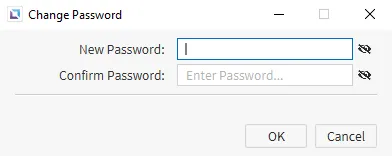 Assigns a password to the user. The password can consist of both uppercase and lowercase letters, numbers, and symbols. There is no limit or length requirement for the password. Assigns a password to the user. The password can consist of both uppercase and lowercase letters, numbers, and symbols. There is no limit or length requirement for the password. |
| Log On Action | Assigns actions or scripts to be executed upon user login. |
| Log Off Action | Assigns actions or scripts to be executed upon user log-off. |
| Add an email to be connected to the user. | |
| User Management Access | Allows the user to edit, add, or remove users in the User Management window during runtime. |
Groups
Section titled “Groups”| Item | Description |
|---|---|
| Group Name | Displays all of the current group names in order of creation. |
| Description | Displays all of the current descriptions of created groups. |
| Users | Displays all of the current users assigned to created groups. |
| Permissions | Displays all of the current permissions assigned to created groups. |
| Add Group | Adds a group. |
| Delete Group | Deletes the selected group. |
| Edit Group | Edits the selected group. |
Edit Group
Section titled “Edit Group”| Item | Description |
|---|---|
| Group Name | Assigns a unique name to the group. |
| Users | Assigns selected users to the group. Users need to be created before assignment. |
| Permissions | Assigns selected permissions to the group. Permissions need to be created before assignment. |
| Description | Assigns a description to the group. |
| Log On Action | Assigns actions or scripts to be executed upon user login. |
| Log Off Action | Assigns actions or scripts to be executed upon user log-off. |
Permissions
Section titled “Permissions”| Item | Description |
|---|---|
| Permission Name | Assigns a unique name to the permission and displays all of the current permission names in order of creation. |
| Description | Displays all of the current descriptions of created permissions. |
| Add Permission | Adds a permission. |
| Delete Permission | Deletes the selected permission. |
Password Mode Passwords
Section titled “Password Mode Passwords”| Item | Description |
|---|---|
| Password | The created passwords. |
| Description | The description assigned to the passwords. |
| Permissions | The selected permissions assigned to the passwords. |
| Add Password | Adds a new password. |
| Delete Password | Deletes a password. |
| Edit Password | Edits a password. |
New/Edit Password
Section titled “New/Edit Password”| Item | Description |
|---|---|
| Edit Password | Sets a new password. |
| Permissions | Displays the selected permissions. |
| Edit | Edits the permissions for the password. |
| Description | Assigns a description to for the password. |
| OK | Saves the password. |
| Cancel | Discards changes to the password. |