Alarm Summary Information
Alarm Summary Tables
Active Alarm
| Item | Description |
|---|---|
| Active Alarms | Displays the currently triggered alarms. |
| Shelved Alarms | Opens the Shelved Alarms tab. |
| Historical Alarms | Opens the Historical Alarms tab. |
| Label Filter | Allows users to decide which alarms they want to view based on labels. |
| Check All | Selects all alarm messages in a specific tab. |
| Active | Checking and unchecking this box will display or hide the active alarms. |
| Cleared | Checking and unchecking this box will display or hide the cleared alarms. |
| Active, Ack. | Checking and unchecking this box will display or hide the acknowledged-active alarms. |
| Cleared, Ack. | Checking and unchecking this box will display or hide the acknowledged-cleared alarms. |
| Acknowledge | Sets an active or cleared alarm to “Active, Ack” or “Clear, Ack”. |
| Shelve | Suppresses an alarm. |
| Unshelve | Removes the suppression of an alarm. |
| Time Dropdown | Sets the length of time to suppress alarms after clicking Shelve. |
| Delete | Deletes an alarm status from the Alarm Summary. |
Shelved Alarm
| Item | Description |
|---|---|
| Active Alarms | Opens the Active Alarms tab. |
| Shelved Alarms | Displays the shelved alarms. |
| Historical Alarms | Opens the Historical Alarms tab. |
| Check All | Selects all alarm messages in a specific tab. |
| Unshelve | Removes the suppression of an alarm. |
Historical Alarm
| Item | Description |
|---|---|
| Active Alarms | Opens the Active Alarm tab. |
| Shelved Alarms | Opens the Shelved Alarms tab. |
| Historical Alarms | Documents every alarm status change. |
| Label Filter | Allows users to decide which alarms they want to view based on labels. |
| Check All | Selects all alarm messages in a specific tab. |
| Active | Checking and unchecking this box will display or hide the active alarms. |
| Cleared | Checking and unchecking this box will display or hide the cleared alarms. |
| Active, Ack. | Checking and unchecking this box will display or hide the acknowledged-active alarms. |
| Cleared, Ack. | Checking and unchecking this box will display or hide the acknowledged-cleared alarms. |
| Delete | Removes an alarm status from the Alarm Summary. |
Alarm Summary
| Item | Description |
|---|---|
 Expand All Expand All | Shows all dropdown content within the Alarm Summary object. |
 Collapse All Collapse All | Hides all dropdown content within the Alarm Summary object. |
| Name | Assigns a name to the user’s Alarm Summary object. |
| Initial Tab | Controls the starting tab on the initialization of the project and re-opening of the page. The default is the “Active Alarms” tab. |
| Active Tab | 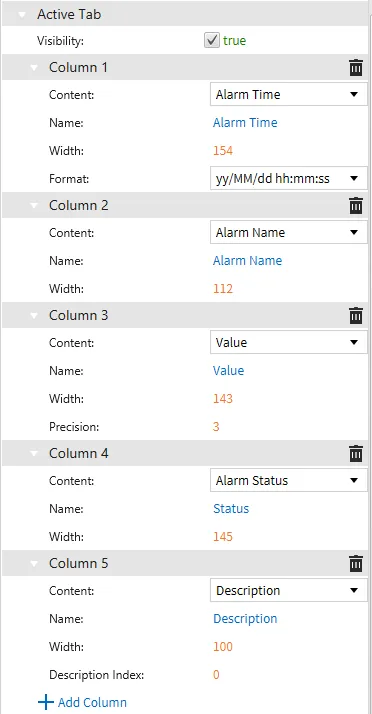 Customize the number of Columns and their respective properties for the Active Tab. Customize the number of Columns and their respective properties for the Active Tab. |
| Shelved Tab | 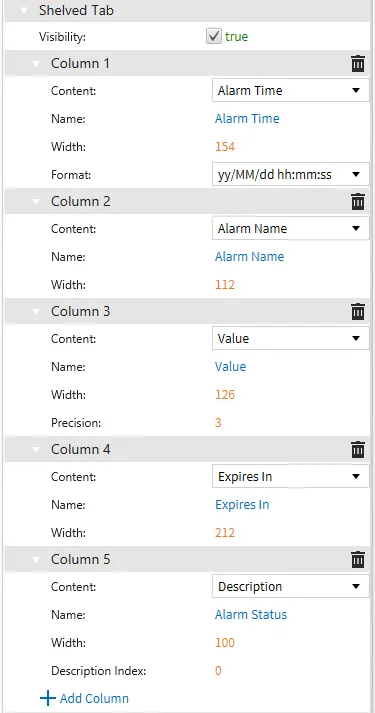 Customize the number of Columns and their respective properties for the Shelved Tab. Customize the number of Columns and their respective properties for the Shelved Tab. |
| Historical Tab | 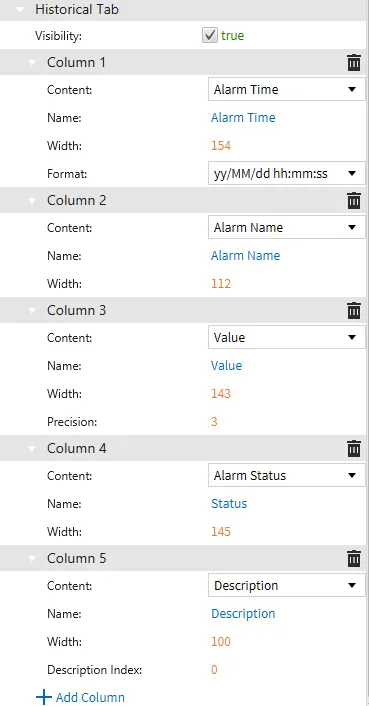 Customize the number of Columns and their respective properties for the Historical Tab. Customize the number of Columns and their respective properties for the Historical Tab. |
| Visibility | Controls whether the tab is visible or not. |
 Delete Delete | Removes the Column from the Alarm Summary. |
| Content | Controls which type of data is shown in the column. |
| Name | Assigns a name to the header of the column. |
| Width | Assigns the default horizontal distance for the column. This can be changed while in runtime. |
| Format | Selects the date/time Format for the “Alarm Time” column. |
| Precision | Selects the number of decimal places to follow a value. |
| Description Index | Assigns the Description to display based on No. # in Edit Alarm’s Descriptions tab. |
| Add Column | Allows the user additional columns for their Alarm Summary. |
Appearance
| Item | Description |
|---|---|
| Visibility | Checkbox to enable/disable the Alarm summary's visibility during project runtime. |
| Opacity | Slider to set the Alarm summary's opacity during project runtime. |
| Blinking | Checkbox to enable/disable the Alarm summary's ability to blink during project runtime. |
| Blinking Interval (ms) | Sets the interval the Alarm summary blinks, in milliseconds, during project runtime. |
| Object Size | Controls the size of the Alarm summary. |
| Background Color | Sets the color of the cells in the Audit Log table. |
| Active Color | Controls the color in which active alarms are displayed. |
| Active Acknowledged Color | Controls the color in which active acknowledged alarms are displayed. |
| Cleared Color | Controls the color in which cleared alarms are displayed. |
| Cleared Acknowledged Color | Controls the color in which cleared acknowledged alarms are displayed. |
| Font Name | The font used to display the text. |
| Display Header | Controls whether the header of each column is shown or not. |
| Display Grid Lines | Controls whether the borders between cells are shown or not. |
| Display User Controls | Controls whether control buttons are shown or not. |
| Show Active Acknowledged | Controls the initial selection of whether Active Acknowledged alarms are displayed or hidden. |
| Show Active Unacknowledged | Controls the initial selection of whether Active Unacknowledged alarms are displayed or hidden. |
| Show Cleared Acknowledged | Controls the initial selection of whether Cleared Acknowledged alarms are displayed or hidden. |
| Show Cleared Unacknowledged | Controls the initial selection of whether Cleared Unacknowledged alarms are displayed or hidden. |
Position
| Item | Description |
|---|---|
| X | The Alarm Summary's X-axis position on the screen. |
| Y | The Alarm Summary's Y-axis position on the screen. |
| Width | The Alarm Summary's width. |
| Height | The Alarm Summary's height. |
| Z Index | The Alarm Summary's display order if behind or on top of other objects. |
| Rotation | The Alarm Summary's rotation, in degrees. |
| Use Percentage | Checkbox to enable/disable the rotation center ranging from 0.0 to 1.0. If disabled, the rotation is in pixels. |
| Rotation Center X | Controls the horizontal location of the rotation anchor. |
| Rotation Center Y | Controls the vertical location of the rotation anchor. |